“Your next team has no idea how lucky they are! Thank you for your generosity, sharp thinking, and steady partnership—wishing you huge success in your new role.”
✦ Coworker Leaving & Goodbye Cards
Free Online Farewell Card for Coworkers & Departing Teammates
Everyone signs from one link — zero login, zero clutter ✍️
Give a leaving colleague a send-off they will actually treasure. Start a virtual farewell card for a colleague in 30 seconds and collect heartfelt goodbye messages, favorite project memories, and LinkedIn stay-in-touch notes from the whole team on one link.

“14 unforgettable years! Every mentorship circle we have exists because you started it.”
Marcus Vance · VP Eng
♥ 14

“Nobody turns chaotic Friday bug-bashes into pure calm joy like you! Wishing you endless Saturdays 🥂”
Elena Rostova · Design
♥ 19
Quick Summary
A free online farewell card (also called a virtual farewell card for a colleague, coworker leaving card, or group goodbye card) lets remote and hybrid teams gather goodbye wishes, inside jokes, and team Polaroid photos before a teammate’s last day. Unlike a paper card passed from desk to desk or a single-sender eCard, OneGroupCard creates free online goodbye cards with one zero-login signing link for up to 500 colleagues on Slack, Microsoft Teams, or email—ready to present live on Zoom or save as a printable PDF keepsake.
Ready to send them off? Start a free farewell card in 30 seconds. New to link-only signing? See how a group card with no sign-up works. If your colleague is retiring rather than moving on, make an online group retirement card instead.
4 Ways to Experience Every Card
Feels Like Opening Real Stationery — Ready for Slack, Zoom & Framing
Recipients can switch freely between all four keepsake views from a single link.
1. Wax-Seal Envelope Reveal
Recipients break the custom wax seal to unfold their 5:7 illustrated cover with celebratory confetti or gold sparkles.
2. Tactile Polaroid Board
Graph-paper, heirloom linen, or starlit velvet boards filled with handwriting fonts, illustrated stamps, and ❤️ reactions.
3. 3D Booklet & Memory Book
Flip page-by-page like a folded greeting card on a desk, or print an archival US Letter / A4 hardcover-style Memory Book.
4. Zoom Party Slideshow & Poster
Share your screen on Zoom/Teams for an auto-advancing toast slideshow, or export a crisp 2400px Wall Poster PNG.
How Free Online Group Cards Work in 4 Simple Steps
Designed so busy organizers set up in 30 seconds—and neither organizers nor signers ever hit a registration wall.
-
1
Pick a 5:7 Cover
Choose an illustrated cover & board backdrop in the live studio and enter your recipient’s name—zero sign-up.
-
2
Share One Link
Drop your signing URL or QR code into Slack, Microsoft Teams, WhatsApp, ClassDojo, or email.
-
3
Everyone Signs Free
Up to 500 people pick a handwriting font, draw an ink autograph, add a stamp, and frame up to 25 Polaroid photos free.
-
4
Deliver, Present or Print
Send the envelope reveal link or gift email free, run the Zoom Slideshow, or unlock a $2.49 Print PDF & 2400px Poster.
Demo Video
See a Farewell Card Come Together in 40 Seconds
A silent screen recording made on the live site with an invented team (no real people, no real photos): create the card, copy the invite link, sign it as a coworker, then open it as the person who is leaving.
- Fill in the create form: pick the occasion and a cover, then type the recipient’s name and your team’s name.
- Create the card and copy the invite link (there is a QR code too) to paste into Slack, WhatsApp or email.
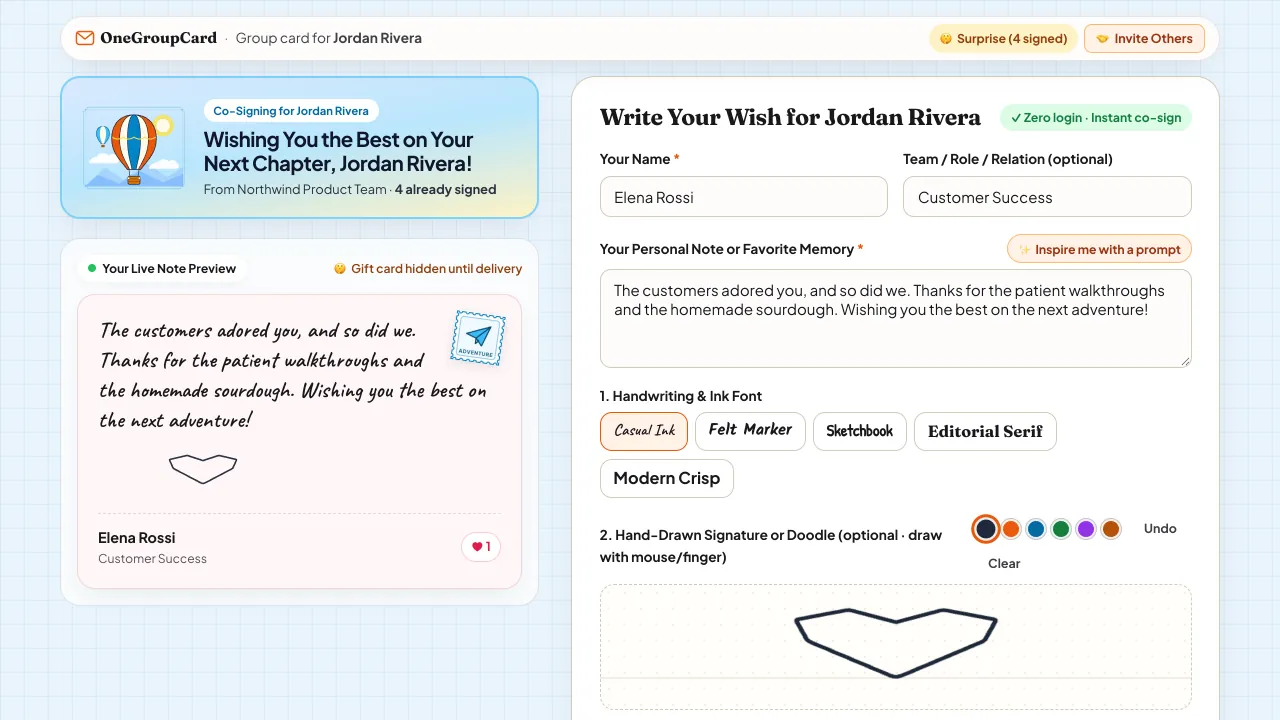
- A coworker opens the link, types a note, picks a handwriting font, draws a signature, adds a stamp and posts it, all without an account.
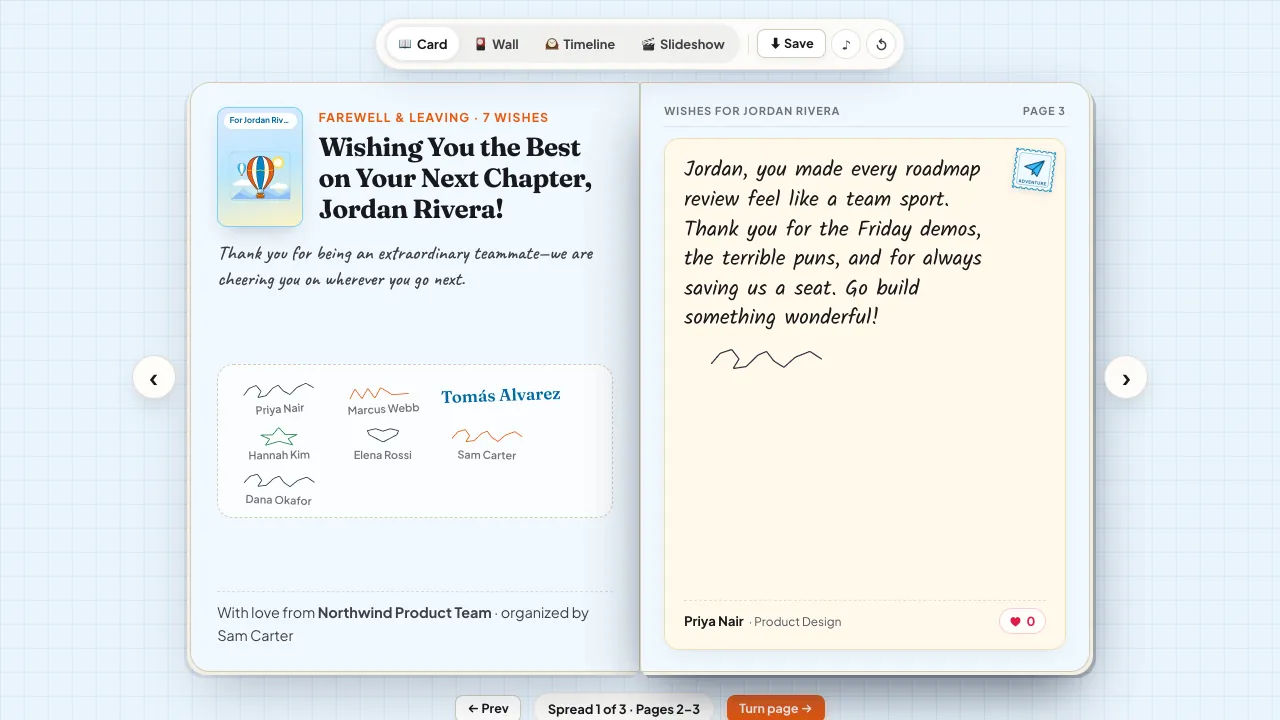
- The person leaving opens the envelope and reads the card as a flip-book, a timeline or a wall of notes.
Real Screenshots
What a Real Farewell Card Looks Like
Two screenshots taken on the live site with an invented team (no real people, no real photos): what a coworker sees when they sign, and what the departing colleague opens afterwards.
Virtual Farewell Cards for Colleagues — Warm Send-Offs Even on Tight Last-Day Timelines
Two-week notices fly by fast. Between handoff docs and wrap-up meetings, organizing a virtual farewell card for a colleague across remote time zones shouldn’t require accounts, subscriptions, or hours of admin work.
With OneGroupCard, you can spin up free online goodbye cards in 30 seconds during Monday standup, drop one secret signing link in Slack or Teams, and let handwritten-style farewell notes and Polaroid photos build up before Friday’s goodbye call.
Last-Minute & Remote Friendly
Create free virtual farewell cards for colleagues in 30 seconds and share one link that holds up to 500 signatures—zero account setup for organizer or signers.
Stay-in-Touch Friendly
The card link is not tied to a company account, so it still opens after your colleague loses company Slack and email access. Signers can add a personal email or LinkedIn handle inside their notes.
Screen-Share Ready for Goodbye Calls
Break the wax-seal envelope or run Fullscreen Party Slideshow live on Zoom, Google Meet, or Microsoft Teams during the team farewell toast.
Copy & Customize Instantly
What to Write in a Virtual Farewell Card for a Colleague (Copy or Use)
Whether you are signing for a close work bestie, a respected manager, or a cross-functional colleague, copy a goodbye message below or pre-load it into a free card.
Warm & Professional Farewell Wishes for a Colleague
Classy, genuine goodbye notes suitable for any coworker, peer, or team lead.
“It has been an absolute privilege working alongside you. Thank you for leaving our codebase, processes, and team culture so much stronger. Stay in touch!”
“Wishing you an exciting next chapter filled with big growth and great people. Don’t be a stranger—let’s grab coffee once you settle in!”
Lighthearted & Work-Bestie Online Goodbye Card Notes
Playful send-off wishes that still carry real appreciation.
“Rude of you to leave us for an exciting new adventure, honestly—but we couldn’t be prouder of you! Promise me our Slack memes will continue over text.”
“Who am I supposed to exchange knowing looks with on Monday morning calls now?! Go crush your new role—we are cheering so loudly for you!”
“Goodbye to our favorite problem-solver! Wishing you awesome new coworkers (though obviously slightly less awesome than us).”
From a Manager or Team Lead to a Departing Teammate
Specific praise plus an offer to help, which is what a leaving report remembers.
“You raised the bar for this team without ever making it about you. Thank you for the standards you set, the people you mentored, and the handoff docs I will be quoting for months. My door and my reference are open to you any time.”
“Watching you go from the person who asked every good question in week one to the person we all ask now has been one of the best parts of my job. Go lead something big, and keep me posted.”
“Thank you for giving me honest feedback and for taking mine seriously. Wherever you land next, they are getting someone who makes everyone around them better.”
Short Goodbye Messages When You Only Have a Minute
One or two lines that still sound like you, for a card that closes this afternoon.
“Thank you for every “quick question” you answered. We will miss you!”
“This team will not be the same without you. Stay in touch and good luck!”
“You made the hard weeks easier. Wishing you the very best in what comes next.”
“So glad I got to work with you. Keep in touch!”
Supportive Notes for a Colleague Leaving Unexpectedly
When the exit was not their choice, skip the “new adventure” cheer and be specific and steady.
“Your work here mattered, and that does not change with a date on the calendar. I am grateful for everything I learned from you, and I am happy to be a reference or make an introduction whenever you want one.”
“I am sorry this is how your time here ends. You were a big part of what made this team good to be on. Please stay in touch, and tell me what I can do to help.”
“Thank you for the late nights, the patient explanations and the kindness. Whoever hires you next is getting someone special.”
3 Organizer Tips for a Memorable Colleague Leaving Card
Keep Surprise Protection on while collecting
Enable Surprise Protection so nobody accidentally spoils the goodbye board if the link gets forwarded into a public Slack channel before their final afternoon.
Deliver to their personal email, not work email
If IT switches off company email when your colleague leaves, a card link sent there goes with it. Send the finished card to their personal email or LinkedIn DM so they can still open it, and download the free HD cover and poster PNG as a copy they can keep.
Prompt teammates for one specific project memory
Ask signers “What will you miss most or remember from shipping with Jordan?” so your free online goodbye card fills with real stories instead of one-word sign-offs.
How OneGroupCard Compares to Paid Group Card Services & Paper Cards (Checked Nov 20, 2026)
Full collaborative group signing is $0 forever—upgrade for $2.49 only when you want ad-free custom gift branding, monogram wax seals, or a Printable PDF Memory Book.
Paid-service figures come from the single-card and single-board prices that GroupTogether, GroupGreeting, Thankbox and Kudoboard list on their own pricing pages (checked November 20, 2026). Prices change, so confirm before paying.
| Feature | OneGroupCard | Paid Group Card Services ($5.50–$19.99) | Office Paper Card |
|---|---|---|---|
| Create, collect up to 500 wishes & deliver online or by email | $0 Free Forever | $5.50 – $19.99 per card or board, depending on the service and its post limit | Card purchase + postage |
| Account required for card organizer (creator)? | No — instant in browser (optional backup/sync) | Often yes: GroupGreeting and GroupTogether organizers work from an account | In-person buyer |
| Account or email required for co-signers? | Never | Varies: GroupGreeting signers need only a name; GroupTogether asks signers for an email address | In-office desk only |
| Handwriting fonts, ink signatures, stamps & 25 Polaroid photos | Included Free | Photos and GIFs are standard on paid cards; styles vary by service | Manual printing & glue |
| Envelope Reveal + 3D Flip Booklet + Pinboard + Zoom Slideshow | All Included Free | Varies: card, board or slideshow layouts depending on the service | Crowded paper margins |
| Print PDF Memory Book, 2400px Poster, PRO Foil Covers & Scheduled Send | $2.49 one-time ($1.49/card in 10-Pack) | A PDF copy is often included in the card price (GroupGreeting, GroupTogether); posters and printed books vary | Not possible |
Transparent Fit & Product Boundaries
Who OneGroupCard Is Best For (and When Another Tool Fits Better)
Clear facts on where OneGroupCard shines—and where specialized enterprise or gift-pooling tools are a better fit.
✓ Best For
- Remote and hybrid teams collecting 5 to 500 coworker farewell, retirement, work anniversary, or birthday notes via Slack, Teams, or email on a free card that holds up to 500 signatures
- Retirements and milestone tributes that need both an interactive online reveal and a print-ready US Letter / A4 Memory Book PDF
- Classroom room parents and families collecting student thank-you notes and drawing photos over WhatsApp or ClassDojo with zero login friction
- Organizers who want transparent $0 online cards or a $2.49 one-time keepsake upgrade with zero monthly subscriptions
△ When Another Tool Fits Better
- Pooled cash collection or built-in retail e-gift card payouts (if your primary goal is collecting group gift money and issuing merchant gift cards in one checkout, tools like GroupTogether or Thankbox fit better)
- Async recorded video montage reels (OneGroupCard focuses on handwritten-style notes, ink signatures, stamps, and Polaroid photos rather than multi-gigabyte video compilation)
- Automated physical print-and-ship mail fulfillment (OneGroupCard generates print-calibrated US Letter / A4 PDFs and 2400px Poster PNGs for home or local print-shop printing rather than mailing paper stock on your behalf)
- Enterprise HRIS auto-provisioning with SCIM/SSO seats and automated Slack bot reminders
Frequently Asked Questions
How do I create a free virtual farewell card for a colleague with no sign-up?
Enter your departing colleague’s name in the live studio on this page, pick a farewell cover, and copy your instant signing link. Neither you (the organizer) nor up to 500 colleagues need to create an account—just paste the link in Slack, Microsoft Teams, WhatsApp, or email so everyone can add goodbye notes, ink signatures, and up to 25 Polaroid photos for $0.
How do you sign a farewell card for a coworker without sounding generic?
Use a quick 3-part formula: (1) thank them for one specific trait or project moment you appreciated, (2) wish them genuine success in their new role or adventure, and (3) include how you’d love to keep in touch (such as LinkedIn or coffee).
How late can we start free online goodbye cards before someone’s last day?
Because signers don’t need to register or verify an email, you can start a farewell card the morning before—or even the morning of—a colleague’s final day. Signers only enter a name and a message, so post the link in the team channel with a cutoff time (for example, “open until 3 PM”) and send one reminder before it closes.
Can our departing colleague still view their farewell card after losing company email access?
Yes. The card link is not tied to a company account, so send the recipient link to their personal email or LinkedIn DM and it opens the same way after offboarding. For a copy they can keep offline, download the free HD cover and poster PNG, or unlock the optional $2.49 Keepsake Pass for a printable US Letter / A4 PDF Memory Book.
Will our colleague see the messages before the farewell call?
Not by default. Surprise Protection is on unless you switch it off: until you deliver the card, anyone who opens the recipient link sees a sealed “surprise in the making” page that shows how many people have signed, not what they wrote. You can turn it off from the organizer dashboard, and the optional $2.49 Keepsake Pass adds scheduled auto-delivery.
Can clients or former teammates outside the company sign too?
Yes. Signing needs no account, so anyone you send the signing link to can add a note, an ink signature and photos. The link works for whoever has it, so share it only with the people you want to include rather than in a public channel.
What do you write in a card for someone who is leaving unexpectedly?
Skip “new adventure” cheer and keep it specific and steady: name one thing they did well, say the team valued it, and offer something concrete such as being a reference or making an introduction. The “Supportive Notes for a Colleague Leaving Unexpectedly” examples above show the tone, and “Start Card with Wish” pre-loads one into a free card.
What is the difference between a farewell card, goodbye card, and leaving card?
They describe the exact same collaborative team send-off across regions: US teams usually search for a virtual farewell card or free online goodbye card, while UK, Canadian, and Australian offices call it an online leaving card. OneGroupCard lets you customize the exact cover headline for your team.